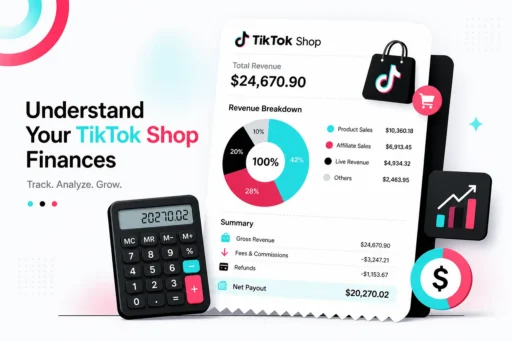
Your settled statement is the only document where TikTok shows its math. It's also the document almost no seller reads — they check the payout number, shrug at the gap between revenue and deposit, and move on. That gap is where the leak lives. From the accounts we audit, sellers who never read their statements line by line are reliably leaking 1–3% of GMV.
Here's how the statement is built, what each piece means, and where to look first.
The basic equation
Every settled statement reduces to one formula:
What the customer paid − refunds − fees − adjustments = your settlement.
Each of those four buckets has line items underneath it, and three of the four can contain errors in TikTok's favor. Your job isn't to admire the math — it's to verify it.
Section by section
Revenue. What buyers paid for your products, plus customer-paid shipping where applicable. This is the number everything else gets subtracted from. Cross-check it against your order export — settled revenue lags order revenue because orders only settle after delivery and the return window, so don't panic when this month's statement doesn't match this month's sales.
Refunds. Every refund issued in the period, deducted at full value. This is the bucket to interrogate hardest. A refund line tells you money left — it doesn't tell you why. Refunds caused by logistics failures (lost packages, transit damage on covered shipments) belong under TikTok's logistics coverage, not your P&L. Refunds where the product never came back to you may be claimable. A statement treats all refunds identically; your reconciliation shouldn't. See TikTok refunded the buyer and they kept your product for the worst version of this.
Fees. Referral/commission fees, transaction fees, shipping fees, FBT fulfillment fees if you use Fulfilled by TikTok, and program fees. Each is a percentage or a rate — which means each can be wrong. Wrong category rate, fees on cancelled orders, shipping charges that don't match the label actually used. Full breakdown in TikTok Shop fees explained.
Adjustments. The junk drawer: chargebacks, platform corrections, reversals, promo reconciliations, and — importantly — reimbursements owed to you. Adjustments cut both ways, and the negative ones deserve their own post: adjustment charges explained.
The five line items that leak money
When we audit a statement, these get checked first:
- Refunds with no matching return. The item never came back, or came back and vanished at the warehouse. Potentially claimable.
- Refunds with logistics root causes. Lost or damaged in transit on TikTok Shipping — covered up to total retail value, claimable for 90 days from delivery.
- Fee lines that don't match the rate card. Wrong commission tier, fees on orders that were cancelled or refunded.
- Negative adjustments with no explanation you can trace to an order. Guilty until proven innocent.
- Reimbursements that never posted. Approved claims should appear on a settled statement within about 5 business days. If you filed a claim and the credit isn't there at the right value, the claim isn't done.
Make verification a habit, not a project
The statement check that matters takes one pass per statement: tie every refund to a root cause, every fee to a rate, every adjustment to an order, and every approved claim to a posted credit. Do it every cycle and discrepancies surface while they're still claimable — remember, FBT claims expire 60 days from order creation. Do it quarterly and you're mostly documenting money that's already gone.
Most sellers will read this, agree, and never do it — it's tedious, and the dashboard looks fine. That's exactly why the leak persists. One brand we audit had healthy-looking statements and $30,800 in recoverable claims sitting inside them.
We read statements for a living. Free audit of your TikTok Shop account in 24 hours, every eligible claim filed within TikTok's terms of service, and we only get paid a percentage of what we recover — $710K+ recovered for sellers in 2026 so far.
Get your free TikTok Shop audit →
FAQ
What is a settled statement on TikTok Shop? The periodic document in Seller Center showing how your payout was calculated: order revenue minus refunds, fees, and adjustments for orders that have settled (delivered and past the return window).
Why doesn't my settled statement match my sales? Orders settle after delivery plus the return window, so settled revenue lags order revenue. Refunds, fees, and adjustments from older orders also post in later periods.
What are adjustments on a TikTok Shop statement? Corrections outside normal order flow: chargebacks, fee corrections, platform reversals, promo reconciliations, and reimbursement credits. Negative adjustments should each be traceable to a specific order — dispute any that aren't.
How do I know if a reimbursement was actually paid? Approved reimbursements post to a settled statement in roughly 5 business days. Check that the credit appears and matches the approved amount — approval is not payment.